> ## Documentation Index
> Fetch the complete documentation index at: https://help.revenuehero.io/llms.txt
> Use this file to discover all available pages before exploring further.
# How to integrate Freshsales CRM?
> Connect Freshsales as your CRM so RevenueHero can route on your records and write meeting activity automatically.
RevenueHero routes on what your CRM knows. Connecting Freshsales gives RevenueHero access to your accounts, contacts, and owners, so it can match a prospect to their existing owner, route on CRM fields, and write meeting activity back, the same way it works with Salesforce or HubSpot.
**BEFORE YOU BEGIN**
You need to be an admin in both RevenueHero and Freshsales to authorize the connection.
## Connect Freshsales
1. In the left sidebar, click **Settings → Integrations**.
2. In the **CRM** section, click **Connect Freshsales**.
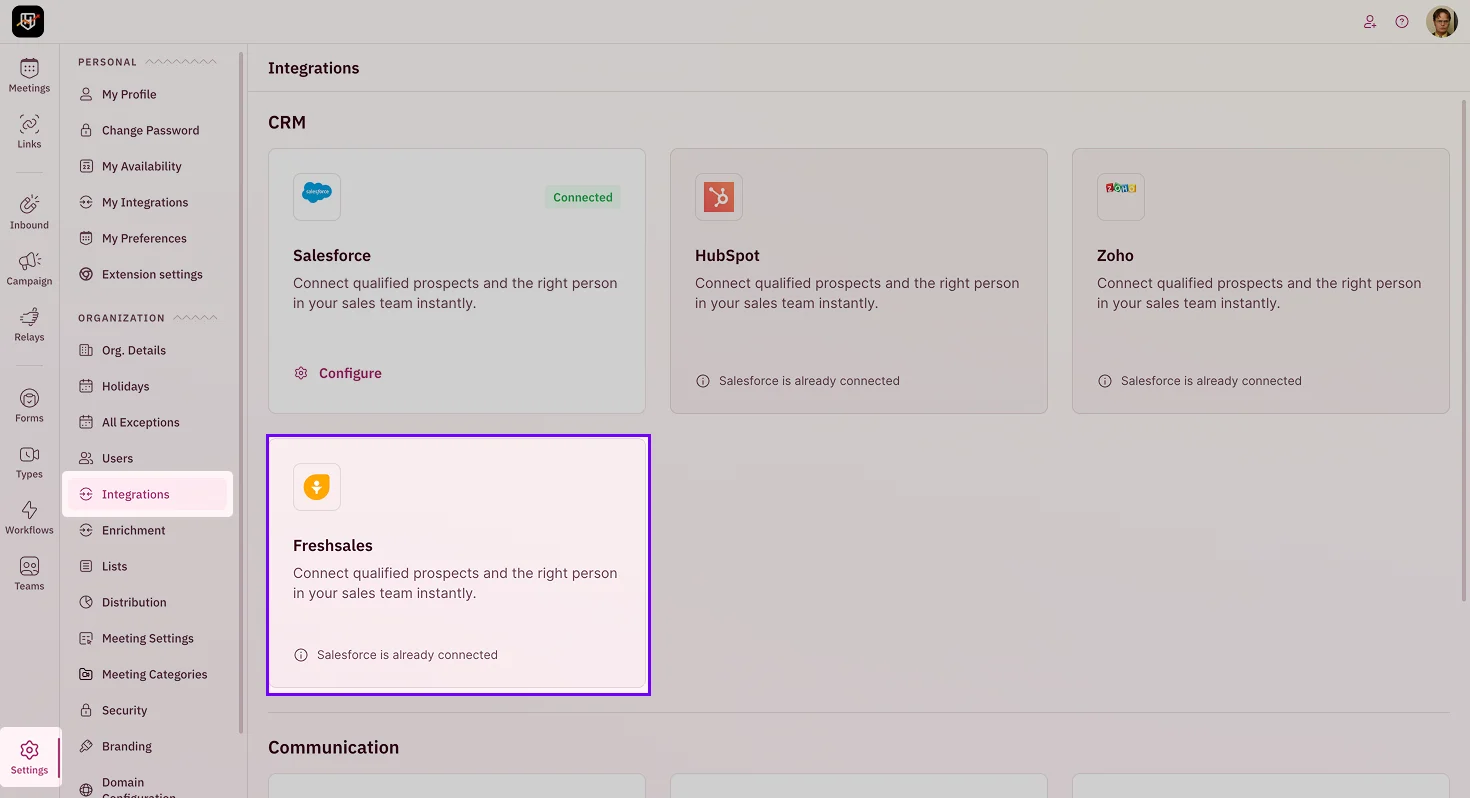 3. Authorize RevenueHero in the Freshsales authentication screen. This grants RevenueHero the access it needs to read your records and update fields and contacts based on your routing and workflows.
4. Once authorized, you'll see Freshsales as connected.
## What the connection enables
With Freshsales connected, you can:
* **Match** a prospect to their existing owner with [Matching Rules](/rules/matching/create-matching-rule).
* **Route** on Freshsales fields in the [Condition Builder](/rules/condition-builder).
* **Sync** meeting activity and outcomes back to the Freshsales record.
***
Freshsales is connected. Your routing now runs on your CRM, and meetings flow back into it. 🎉🎉🎉
Route to existing CRM owners.
Route on CRM fields.
Put your CRM data to work.
3. Authorize RevenueHero in the Freshsales authentication screen. This grants RevenueHero the access it needs to read your records and update fields and contacts based on your routing and workflows.
4. Once authorized, you'll see Freshsales as connected.
## What the connection enables
With Freshsales connected, you can:
* **Match** a prospect to their existing owner with [Matching Rules](/rules/matching/create-matching-rule).
* **Route** on Freshsales fields in the [Condition Builder](/rules/condition-builder).
* **Sync** meeting activity and outcomes back to the Freshsales record.
***
Freshsales is connected. Your routing now runs on your CRM, and meetings flow back into it. 🎉🎉🎉
Route to existing CRM owners.
Route on CRM fields.
Put your CRM data to work.