> ## Documentation Index
> Fetch the complete documentation index at: https://help.revenuehero.io/llms.txt
> Use this file to discover all available pages before exploring further.
# How does Balanced Round Robin work?
> Route the next meeting to the rep carrying the lightest current workload, so no one gets buried while others sit idle, instead of cycling reps in a fixed order.
Most round robins assign the next meeting to the next rep in line, whether or not that rep already had a heavy week. Balanced Round Robin changes the input it looks at. Instead of position in a fixed cycle, it looks at how many meetings each rep currently holds and steers the next booking toward whoever is carrying the lightest load. Teams moving off other routers usually pick it for one reason: it keeps distribution fair without anyone watching a spreadsheet.
**BEFORE YOU BEGIN**
Round Robin is an account-wide setting. The algorithm you pick here applies to every distribution rule and relay pod tied to your organization.
1. [Create a Team to distribute meetings across](/teams/create-teams)
2. [Set up a Distribution Rule](/rules/distribution/create-distribution-rule)
## How Balanced Round Robin works
Every rep in a Round Robin queue carries an internally calculated **Level**, a score for where they stand relative to everyone else in the cycle. Balanced Round Robin reads that Level before each assignment and routes the meeting to the rep who is furthest behind. When a rep pulls ahead, Balanced temporarily holds them out of the queue until the rest of the team catches up, keeping the gap between the busiest and quietest rep small.
This is the one thing that separates Balanced from Strict and Flexible: it assigns by **current workload** rather than a fixed cycle order or the first available slot. The result is even distribution by real workload, without anyone managing the queue by hand.
## Choose Balanced Round Robin
### Step 1: Open Distribution settings
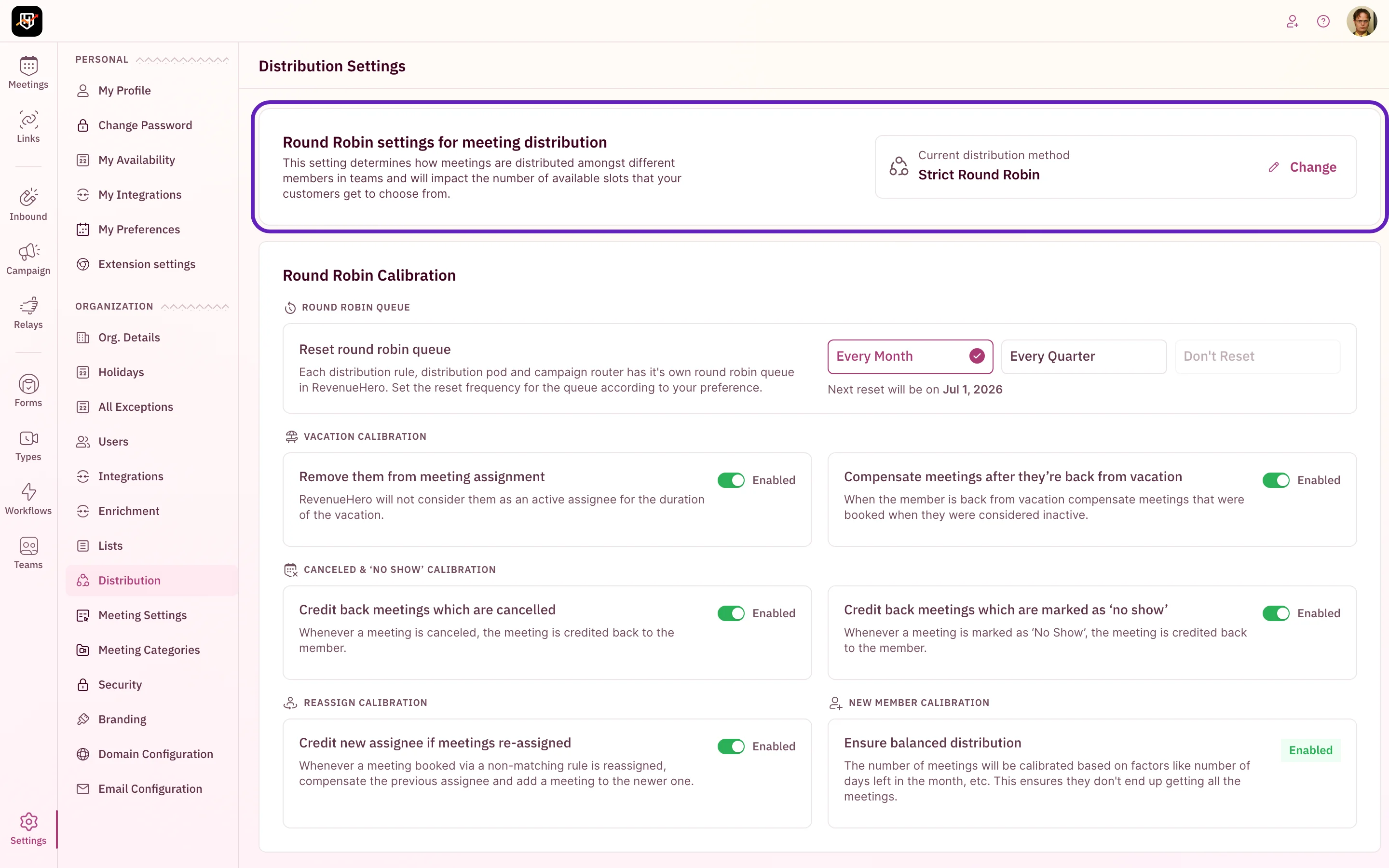
1. In the left sidebar, click **Settings → Distribution**.
2. On the **Round Robin settings for meeting distribution** card, click **Change**.
 ### Step 2: Select Balanced Round Robin
The Round Robin picker shows all three algorithms side by side with a short diagram of how each assigns meetings. Pick **Balanced Round Robin** from the **Select distribution method** dropdown, then click **Save**.
### Step 2: Select Balanced Round Robin
The Round Robin picker shows all three algorithms side by side with a short diagram of how each assigns meetings. Pick **Balanced Round Robin** from the **Select distribution method** dropdown, then click **Save**.
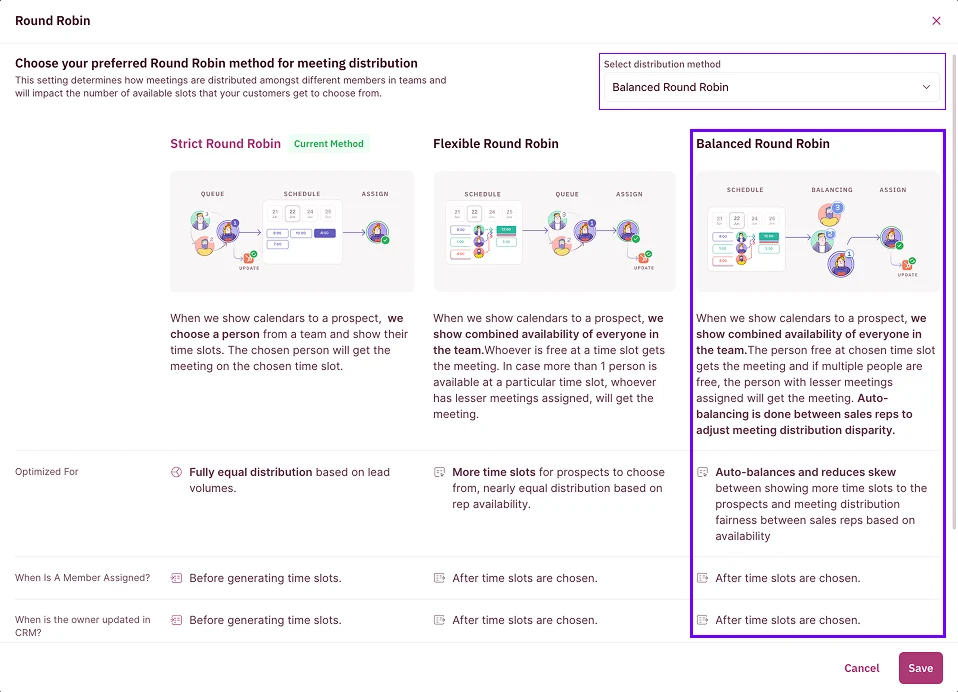 Switching the algorithm takes effect immediately for every distribution rule and relay pod in your account. If you want to try Balanced Round Robin on one team first, change it during a low-volume window and watch your [Round Robin History](/rules/distribution/round-robin-history) before peak hours.
## How Balanced Round Robin reads weightage
Balanced Round Robin still respects the weightage you set on a distribution rule. Weightage is the ratio of meetings a rep should receive relative to the rest of the team. A senior rep set to a higher weightage takes proportionally more meetings, and Balanced Round Robin balances the queue around that target rather than around a flat split. This is how teams run a deliberate 3:1 or 5:1 distribution while still keeping the load balanced around that ratio.
You set per-member weightage when you build the distribution rule. See [Create a Distribution Rule](/rules/distribution/create-distribution-rule).
## When a rep stops getting meetings
If one rep goes quiet for a stretch while everyone else keeps booking, the usual cause is a credit adjustment that pushed their Level out of balance, not a bug. A single manual credit, or a run of cancellations, can move a rep far enough down the queue that they wait a long time for the next meeting.
You can correct this from [Round Robin History](/rules/distribution/round-robin-history): hover next to the rep's **Level**, then add or remove credits to nudge them back into rotation. Adding a credit puts the rep in a deficit so they get meetings sooner; removing a credit does the opposite.
Check Round Robin History before assuming distribution is broken. The **Level**, **Meeting Assigned**, **Cancelled or No-show**, and vacation indicators show exactly why each rep is where they are in the queue.
## Balanced vs Strict vs Flexible
| Algorithm | How it assigns | Optimized for |
| -------------------- | ------------------------------------------------------------------------------------------------------------------ | -------------------------------------------------------------------------- |
| Strict Round Robin | Picks a rep from the team first, then shows only that rep's slots | Fully equal distribution based on lead volume |
| Flexible Round Robin | Shows the team's combined availability; whoever is free takes the slot, and ties go to the rep with fewer meetings | More slots for the prospect, near-equal distribution based on availability |
| Balanced Round Robin | Shows combined availability, then auto-balances toward the lightest-loaded rep | Even distribution by current workload, reducing skew across reps |
For a full breakdown of when to choose each, see [Round Robin methods](/rules/distribution/round-robin-methods).
***
Balanced Round Robin is set. Your meetings now distribute by real workload, so no rep gets buried while others sit idle. 🎉🎉🎉
Compare Strict, Flexible, and Balanced and pick the right one.
See where every rep stands and credit meetings back manually.
Build the routing logic and set per-member weightage.
Control how vacations, no-shows, and reassignments affect the queue.
Switching the algorithm takes effect immediately for every distribution rule and relay pod in your account. If you want to try Balanced Round Robin on one team first, change it during a low-volume window and watch your [Round Robin History](/rules/distribution/round-robin-history) before peak hours.
## How Balanced Round Robin reads weightage
Balanced Round Robin still respects the weightage you set on a distribution rule. Weightage is the ratio of meetings a rep should receive relative to the rest of the team. A senior rep set to a higher weightage takes proportionally more meetings, and Balanced Round Robin balances the queue around that target rather than around a flat split. This is how teams run a deliberate 3:1 or 5:1 distribution while still keeping the load balanced around that ratio.
You set per-member weightage when you build the distribution rule. See [Create a Distribution Rule](/rules/distribution/create-distribution-rule).
## When a rep stops getting meetings
If one rep goes quiet for a stretch while everyone else keeps booking, the usual cause is a credit adjustment that pushed their Level out of balance, not a bug. A single manual credit, or a run of cancellations, can move a rep far enough down the queue that they wait a long time for the next meeting.
You can correct this from [Round Robin History](/rules/distribution/round-robin-history): hover next to the rep's **Level**, then add or remove credits to nudge them back into rotation. Adding a credit puts the rep in a deficit so they get meetings sooner; removing a credit does the opposite.
Check Round Robin History before assuming distribution is broken. The **Level**, **Meeting Assigned**, **Cancelled or No-show**, and vacation indicators show exactly why each rep is where they are in the queue.
## Balanced vs Strict vs Flexible
| Algorithm | How it assigns | Optimized for |
| -------------------- | ------------------------------------------------------------------------------------------------------------------ | -------------------------------------------------------------------------- |
| Strict Round Robin | Picks a rep from the team first, then shows only that rep's slots | Fully equal distribution based on lead volume |
| Flexible Round Robin | Shows the team's combined availability; whoever is free takes the slot, and ties go to the rep with fewer meetings | More slots for the prospect, near-equal distribution based on availability |
| Balanced Round Robin | Shows combined availability, then auto-balances toward the lightest-loaded rep | Even distribution by current workload, reducing skew across reps |
For a full breakdown of when to choose each, see [Round Robin methods](/rules/distribution/round-robin-methods).
***
Balanced Round Robin is set. Your meetings now distribute by real workload, so no rep gets buried while others sit idle. 🎉🎉🎉
Compare Strict, Flexible, and Balanced and pick the right one.
See where every rep stands and credit meetings back manually.
Build the routing logic and set per-member weightage.
Control how vacations, no-shows, and reassignments affect the queue.