> ## Documentation Index
> Fetch the complete documentation index at: https://help.revenuehero.io/llms.txt
> Use this file to discover all available pages before exploring further.
# Strict, Flexible, or Balanced Round Robin: which should you use?
> The three Round Robin methods assign meetings on different inputs. Pick the one that matches whether you optimize for booking speed or even distribution.
RevenueHero gives you three Round Robin methods, and they are not interchangeable. Each one answers a different question before it shows a calendar: should the prospect see one rep's slots or the whole team's, and who wins when more than one rep is free? The method you pick decides how many slots the prospect sees and how evenly meetings land across your team. This page explains what each one does and when to use it.
**BEFORE YOU BEGIN**
Round Robin is an account-wide setting. The method you choose applies to every distribution rule and relay pod in your organization. Change it in **Settings → Distribution → Round Robin settings for meeting distribution → Change**.
## The three methods at a glance
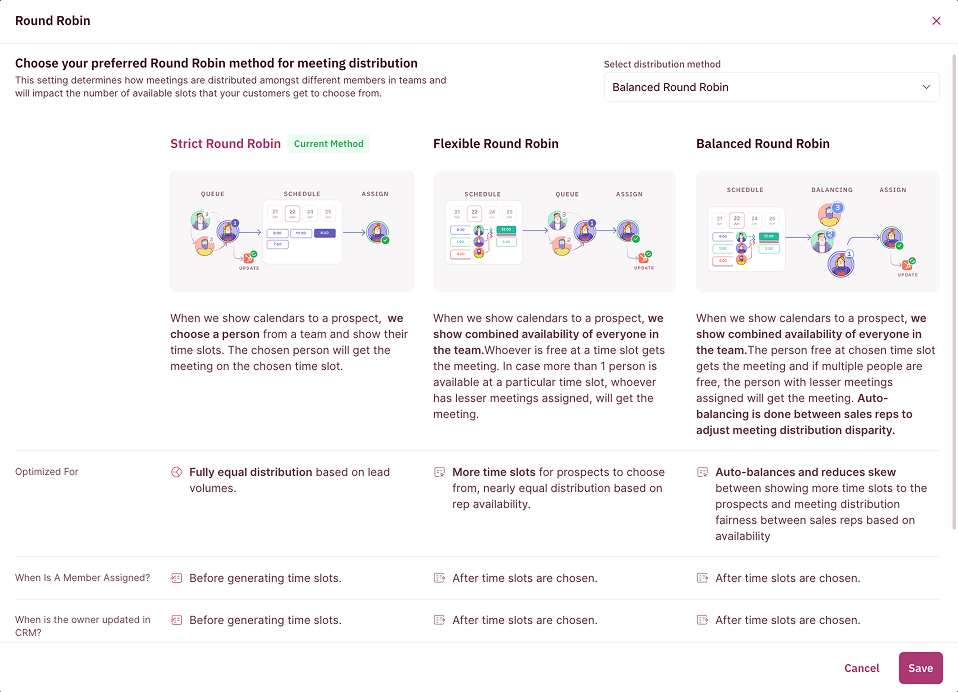 | Method | What the prospect sees | Who gets the meeting | Optimized for |
| ------------ | --------------------------------------- | ---------------------------------------------------------------------------------- | -------------------------------------------------------------------------- |
| **Strict** | One rep's available slots | The rep chosen from the queue for that booking | Fully equal distribution based on lead volume |
| **Flexible** | Combined availability of the whole team | Whoever is free at the chosen slot; ties go to the rep with fewer meetings | More slots for the prospect, near-equal distribution based on availability |
| **Balanced** | Combined availability of the whole team | The free rep at the chosen slot, then auto-balanced toward the lightest-loaded rep | Even distribution by current workload, reducing skew across reps |
## Strict Round Robin
RevenueHero picks a rep from the team first, then shows the prospect only that rep's open time slots. The chosen rep gets the meeting at the slot the prospect books.
Use Strict when you want a predictable, sequential rotation and fully equal distribution tied to lead volume. The trade-off is fewer visible slots, since the prospect only sees one calendar at a time.
Strict pairs well with weightage. Teams running a deliberate ratio, like a 5:1 split between a senior and junior rep, often stay on Strict so the rotation is exact and easy to audit.
## Flexible Round Robin
RevenueHero shows the prospect the combined availability of everyone in the team. Whoever is free at the slot the prospect picks gets the meeting. If more than one rep is open at that slot, the meeting goes to the rep with fewer meetings assigned.
Use Flexible when booking speed and slot availability matter most. Because the prospect sees the whole team's calendar, there are almost always slots open, which lifts booking rates. Distribution stays near-equal but follows availability rather than a fixed order.
Flexible is the common pick for teams that care most about getting the prospect onto a calendar fast and want the widest set of times on screen.
## Balanced Round Robin
Balanced works like Flexible at the calendar, showing combined team availability, but adds a balancing step. The free rep at the chosen slot gets the meeting, and when multiple reps are free the one with fewer meetings wins. On top of that, RevenueHero auto-balances across reps to reduce distribution disparity, so the busiest and quietest rep stay close together.
Use Balanced when even distribution by workload is the priority. For the full detail on how Balanced reads workload, see [Balanced Round Robin](/rules/distribution/balanced-round-robin).
Switching methods takes effect immediately across every distribution rule and relay pod. A safe way to try a new method is to change it during a low-volume window and watch [Round Robin History](/rules/distribution/round-robin-history) before peak hours.
## How to switch methods
1. In the left sidebar, click **Settings → Distribution**.
2. On the **Round Robin settings for meeting distribution** card, click **Change**.
3. In the **Select distribution method** dropdown, pick the method you want. The three cards explain each one as you choose.
4. Click **Save**.
***
That is the difference between the three methods. Pick for booking speed with Flexible, exact rotation with Strict, or workload-balanced fairness with Balanced. 🎉🎉🎉
The workload-aware method, in depth.
Control how vacations, no-shows, and reassignments affect the queue.
See where every rep stands in the current cycle.
Apply a method inside a routing rule with per-member weightage.
| Method | What the prospect sees | Who gets the meeting | Optimized for |
| ------------ | --------------------------------------- | ---------------------------------------------------------------------------------- | -------------------------------------------------------------------------- |
| **Strict** | One rep's available slots | The rep chosen from the queue for that booking | Fully equal distribution based on lead volume |
| **Flexible** | Combined availability of the whole team | Whoever is free at the chosen slot; ties go to the rep with fewer meetings | More slots for the prospect, near-equal distribution based on availability |
| **Balanced** | Combined availability of the whole team | The free rep at the chosen slot, then auto-balanced toward the lightest-loaded rep | Even distribution by current workload, reducing skew across reps |
## Strict Round Robin
RevenueHero picks a rep from the team first, then shows the prospect only that rep's open time slots. The chosen rep gets the meeting at the slot the prospect books.
Use Strict when you want a predictable, sequential rotation and fully equal distribution tied to lead volume. The trade-off is fewer visible slots, since the prospect only sees one calendar at a time.
Strict pairs well with weightage. Teams running a deliberate ratio, like a 5:1 split between a senior and junior rep, often stay on Strict so the rotation is exact and easy to audit.
## Flexible Round Robin
RevenueHero shows the prospect the combined availability of everyone in the team. Whoever is free at the slot the prospect picks gets the meeting. If more than one rep is open at that slot, the meeting goes to the rep with fewer meetings assigned.
Use Flexible when booking speed and slot availability matter most. Because the prospect sees the whole team's calendar, there are almost always slots open, which lifts booking rates. Distribution stays near-equal but follows availability rather than a fixed order.
Flexible is the common pick for teams that care most about getting the prospect onto a calendar fast and want the widest set of times on screen.
## Balanced Round Robin
Balanced works like Flexible at the calendar, showing combined team availability, but adds a balancing step. The free rep at the chosen slot gets the meeting, and when multiple reps are free the one with fewer meetings wins. On top of that, RevenueHero auto-balances across reps to reduce distribution disparity, so the busiest and quietest rep stay close together.
Use Balanced when even distribution by workload is the priority. For the full detail on how Balanced reads workload, see [Balanced Round Robin](/rules/distribution/balanced-round-robin).
Switching methods takes effect immediately across every distribution rule and relay pod. A safe way to try a new method is to change it during a low-volume window and watch [Round Robin History](/rules/distribution/round-robin-history) before peak hours.
## How to switch methods
1. In the left sidebar, click **Settings → Distribution**.
2. On the **Round Robin settings for meeting distribution** card, click **Change**.
3. In the **Select distribution method** dropdown, pick the method you want. The three cards explain each one as you choose.
4. Click **Save**.
***
That is the difference between the three methods. Pick for booking speed with Flexible, exact rotation with Strict, or workload-balanced fairness with Balanced. 🎉🎉🎉
The workload-aware method, in depth.
Control how vacations, no-shows, and reassignments affect the queue.
See where every rep stands in the current cycle.
Apply a method inside a routing rule with per-member weightage.