> ## Documentation Index
> Fetch the complete documentation index at: https://help.revenuehero.io/llms.txt
> Use this file to discover all available pages before exploring further.
# How to integrate RevenueHero with Jotform forms?
> Integrate RevenueHero's scheduler with your Jotform form in 4 simple steps
1. Identify the unique form identifier for your Jotform form which will be inside an Iframe for an embedded Jotform. We'll use the Iframe's name which will be something like `222354402406041`. For Jotform forms, we'll use the identifier as `iframe[name="222354402406041"]`.
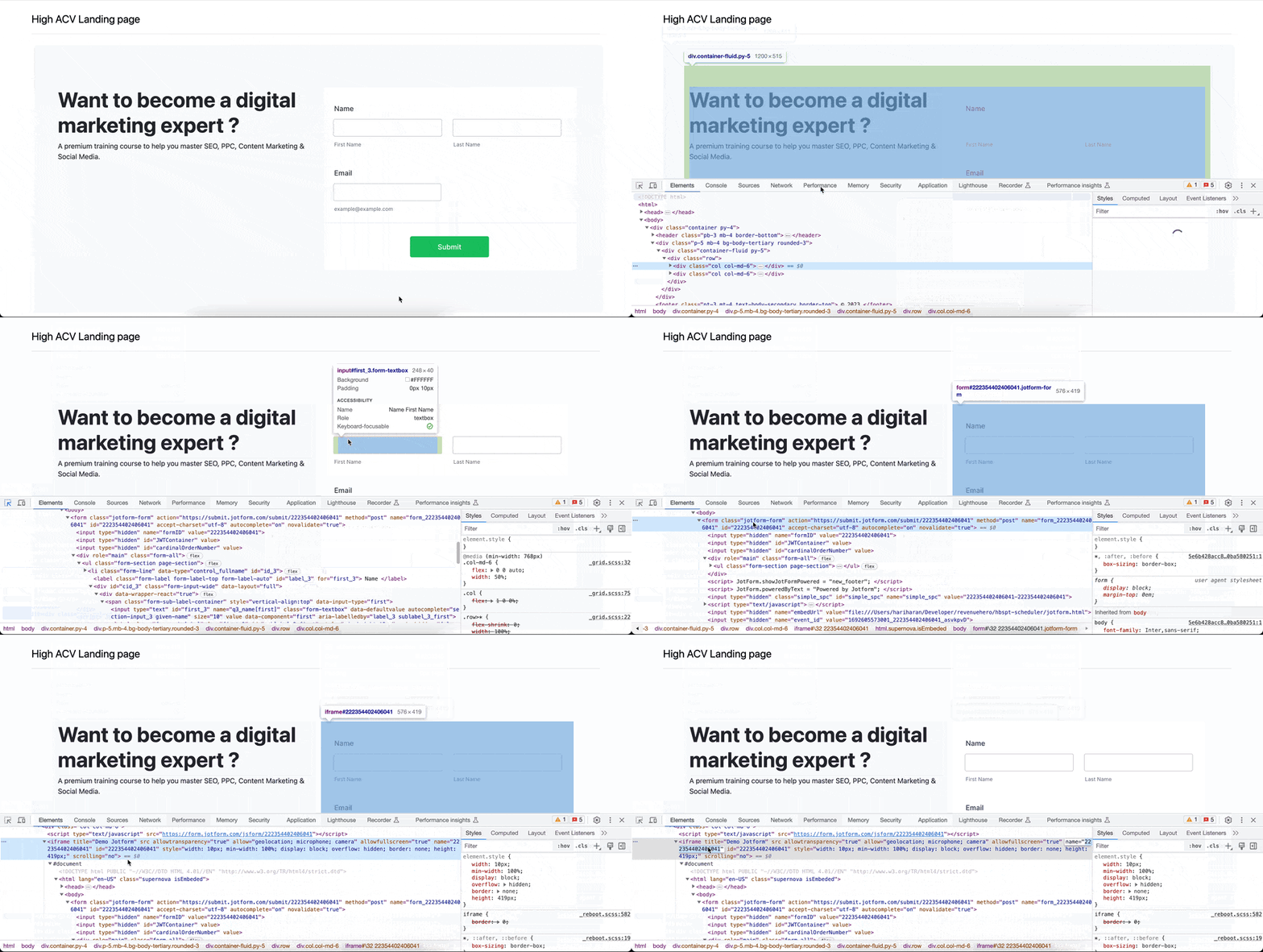 2. Set up an [Inbound Router](/routers/inbound/create-inbound-router) in RevenueHero with the form identifier in your form mapping
3. Copy the [installation script](/routers/inbound/create-inbound-router#install-the-script) from the final step of the router set up.
**NOTE**
When adding the RevenueHero script, make sure that that **form\_type: "jotForm"** is present.
```javascript Sample installation script theme={null}
const hero = new RevenueHero({ routerId: '666', formType: 'jotForm' });
hero.schedule('iframe[name="222354402406041"]'); // Use Iframe name here
```
4. In your landing page HTML, paste the RevenueHero widget script before `` tag and save.
That's it. You're ready to start converting your Demo Meetings from your landing page 🎉🎉
2. Set up an [Inbound Router](/routers/inbound/create-inbound-router) in RevenueHero with the form identifier in your form mapping
3. Copy the [installation script](/routers/inbound/create-inbound-router#install-the-script) from the final step of the router set up.
**NOTE**
When adding the RevenueHero script, make sure that that **form\_type: "jotForm"** is present.
```javascript Sample installation script theme={null}
const hero = new RevenueHero({ routerId: '666', formType: 'jotForm' });
hero.schedule('iframe[name="222354402406041"]'); // Use Iframe name here
```
4. In your landing page HTML, paste the RevenueHero widget script before `` tag and save.
That's it. You're ready to start converting your Demo Meetings from your landing page 🎉🎉