

Why this happens
On WordPress sites running WP Rocket, the File Optimization module can modify the RevenueHero scheduler script in two ways:- JavaScript Minification rewrites the script into a local cached and minified bundle at
wp-content/cache/min/1/scheduler.min.jsinstead of loading it directly from the RevenueHero CDN. - Deferring or delaying execution pushes execution until after page load or the visitor’s first interaction, and adds attributes such as
data-rocket-defer,defer, anddata-rocket-status="executed"to the tag in place of the original ones.
Exclude the script from WP Rocket
Go to WP Rocket → File Optimization and addrevenuehero.io to the Excluded JavaScript Files field under each of these three options:
- JavaScript Minification
- Load JavaScript deferred
- Delay JavaScript Execution
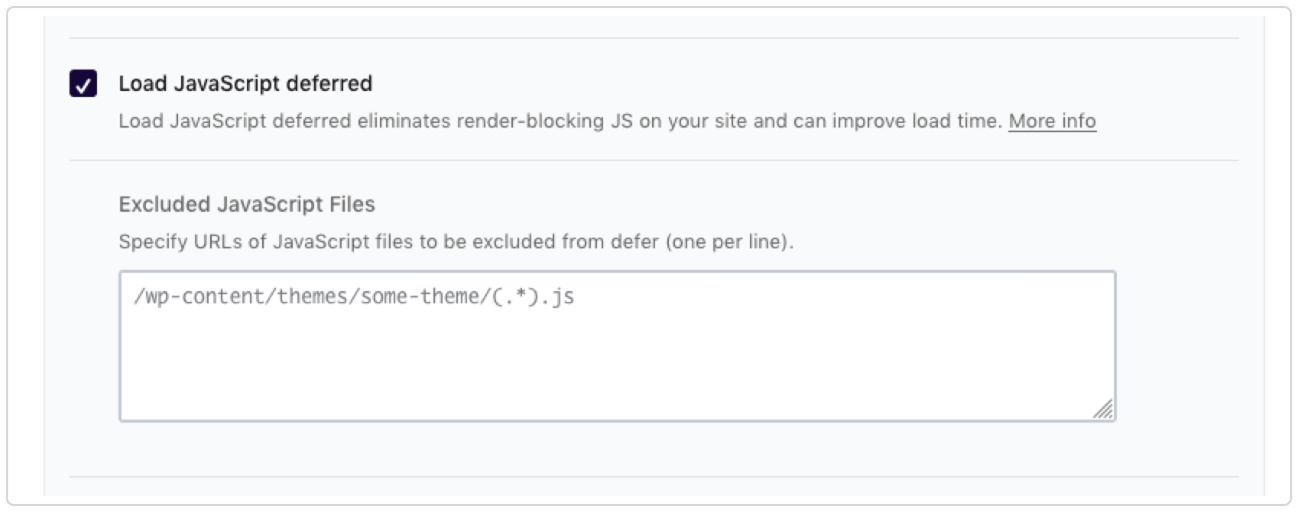
The Excluded JavaScript Files field under Load JavaScript deferred. Add revenuehero.io here, one per line.
Place the script in the footer
Add the script in the footer, just before the closing</body> tag, not in the header. This can be done via the theme’s footer.php, or a header and footer plugin such as WPCode or Insert Headers and Footers.
The second script tag calls hero.schedule() against a form on the page, for example a HubSpot form, by its ID. If this runs before that form has rendered, such as from the <head> or too early in the body, it might fail to find the form. Footer placement guarantees the form already exists in the DOM.
Other optimization plugins
The same principle applies if the site runs a different caching or optimization plugin instead of, or alongside, WP Rocket. Exclude the script from minification, from deferred or delayed execution, and from lazy loading, using the samerevenuehero.io value:
LiteSpeed Cache
Go to Page Optimization → JS Settings and add the RevenueHero script domain to both the general JS Excludes field and the Deferred/Delayed Excludes field.Autoptimize
Go to JS → Options and add the script URL and a matchingrevenuehero keyword to the JavaScript Exclude List, so it is skipped during aggregation and minification.
Other host level optimizers vary in what they call this. Look for a JavaScript optimization or JS combine section and add the same domain.
Verifying the fix
After saving the exclusions, confirm the fix on a live page load, not a cached one:- Clear the WP Rocket cache, and the CDN cache if applicable.
- Reload the page in an incognito or private window.
- In DevTools, find the scheduler tag and confirm it has a real
srcattribute readinghttps://assets.revenuehero.io/scheduler.min.js, not a/wp-content/cache/min/1/...path. - Confirm the tag carries no
data-rocket-*attributes and notype="text/rocketlazyloadscript". - Confirm the scheduler fires on initial page load, not only after a scroll or a click.
Before you go live
-
revenuehero.ioadded to JavaScript Minification → Excluded JavaScript Files -
revenuehero.ioadded to Load JavaScript deferred → Excluded JavaScript Files -
revenuehero.ioadded to Delay JavaScript Execution → Excluded JavaScript Files - Script placed in the footer, just before
</body> - Cache cleared, including the CDN cache
- Verified in an incognito window: direct CDN
src, no defer attributes, fires on page load
Install the RevenueHero script
Every way to invoke the scheduler on your site, from form listeners to programmatic triggers.
Map your web form
Use each field in your form as a routing condition.