
Documentation Index

Fetch the complete documentation index at: https://help.revenuehero.io/llms.txt

Use this file to discover all available pages before exploring further.

Every meeting RevenueHero books, reschedules, or cancels writes back to HubSpot in three places: the Contact that booked, the Meeting Activity record itself, and the meeting owner assignment. This means your reports, workflows, and lists in HubSpot always reflect the live state of the meeting without any manual updates from your reps.

Meeting owner

The meeting owner is updated into the default owner field of the Contact based on your Matching or Distribution rule’s setting.

Contact custom fields

RevenueHero pushes Meeting and Prospect details automatically into your HubSpot Contact properties. You can use these properties to set up Custom Reports, Lists, or Workflows in HubSpot.
NOTERevenueHero auto-creates these fields in HubSpot and updates them with the latest context in a separate group called RevenueHero Meeting Details.
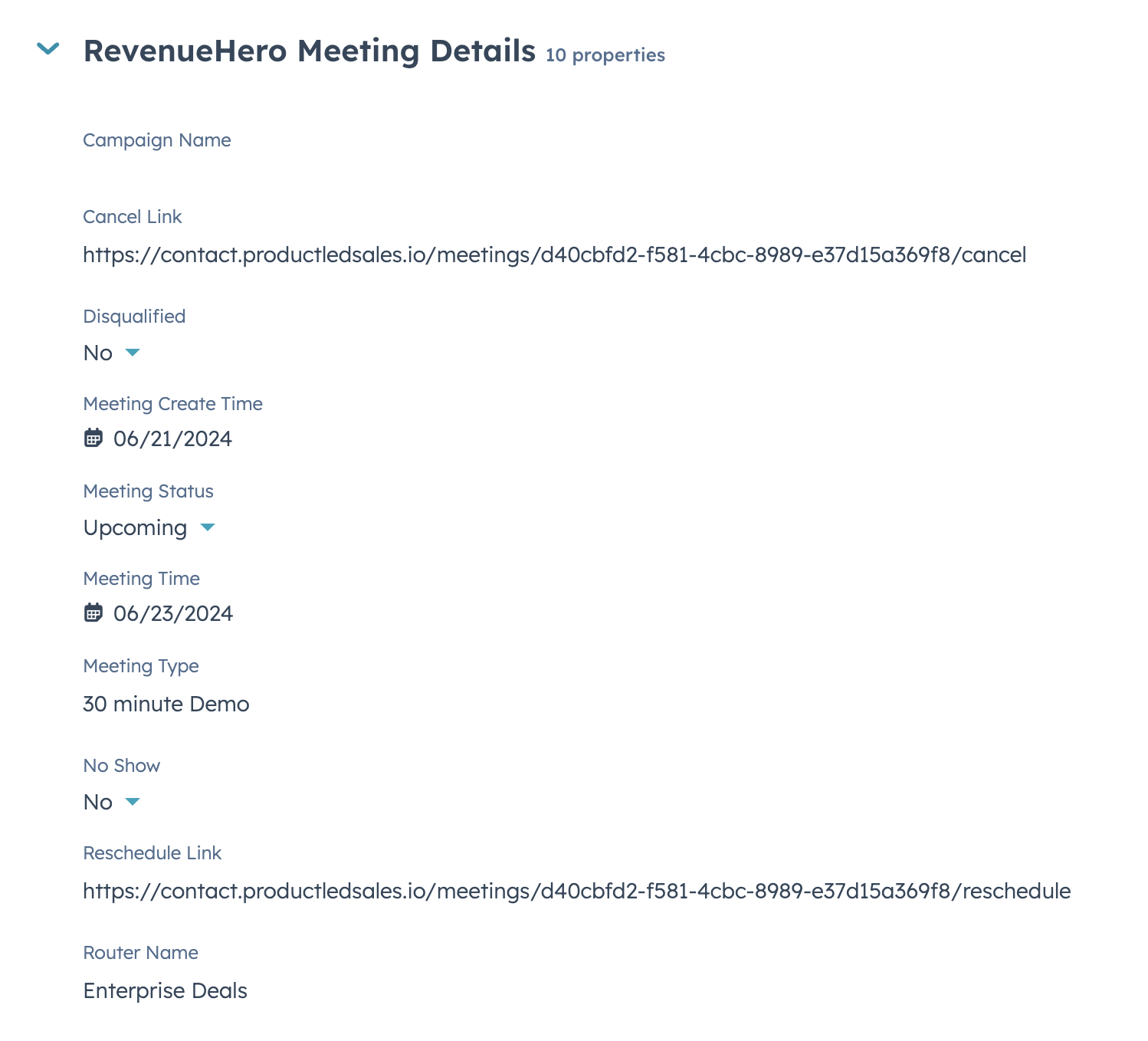
Field LabelInternal Field NameField TypeNotes
Meeting Typerh_meeting_typeSingle-line textMeeting Type name in RevenueHero for Inbound Router, Campaign Router and Relays and the Meeting Link name for Personal Meeting Links
Meeting Timerh_meeting_timeDate pickerMeeting time of meeting in RevenueHero
Meeting Statusrh_meeting_statusDropdown selectStatus of meeting in RevenueHero
No Showrh_no_showSingle checkboxTrue if meeting is marked as No-Show in RevenueHero
Campaign Namerh_campaign_nameSingle-line textCampaign Router name of the meeting in RevenueHero
Router Namerh_router_nameSingle-line textInbound Router or Relay name of the meeting in RevenueHero
Meeting Create Timerh_meeting_created_atDate pickerMeeting creation time of meeting in RevenueHero

Meeting details

RevenueHero creates a Meeting Activity in HubSpot when a meeting is booked in your account, and keeps it in sync as the meeting moves through its lifecycle. You’ll find this Activity under the Meetings tab on your Contact page in HubSpot. The default HubSpot Meeting properties are populated from the booking:
PropertyNotes
Meeting TypeMeeting Type name in RevenueHero for Inbound Router, Campaign Router and Relays and the Meeting Link name for Personal Meeting Links
OutcomeUpdates to Scheduled, Rescheduled, Canceled, Completed or No-Show based on the Meeting Status in RevenueHero
DurationAuto-calculated and displayed from Meeting start and end times pushed from RevenueHero meeting.
Meeting TitleTitle of the meeting in RevenueHero
Meeting DescriptionBody of the meeting invite in RevenueHero

Meeting Activity custom properties

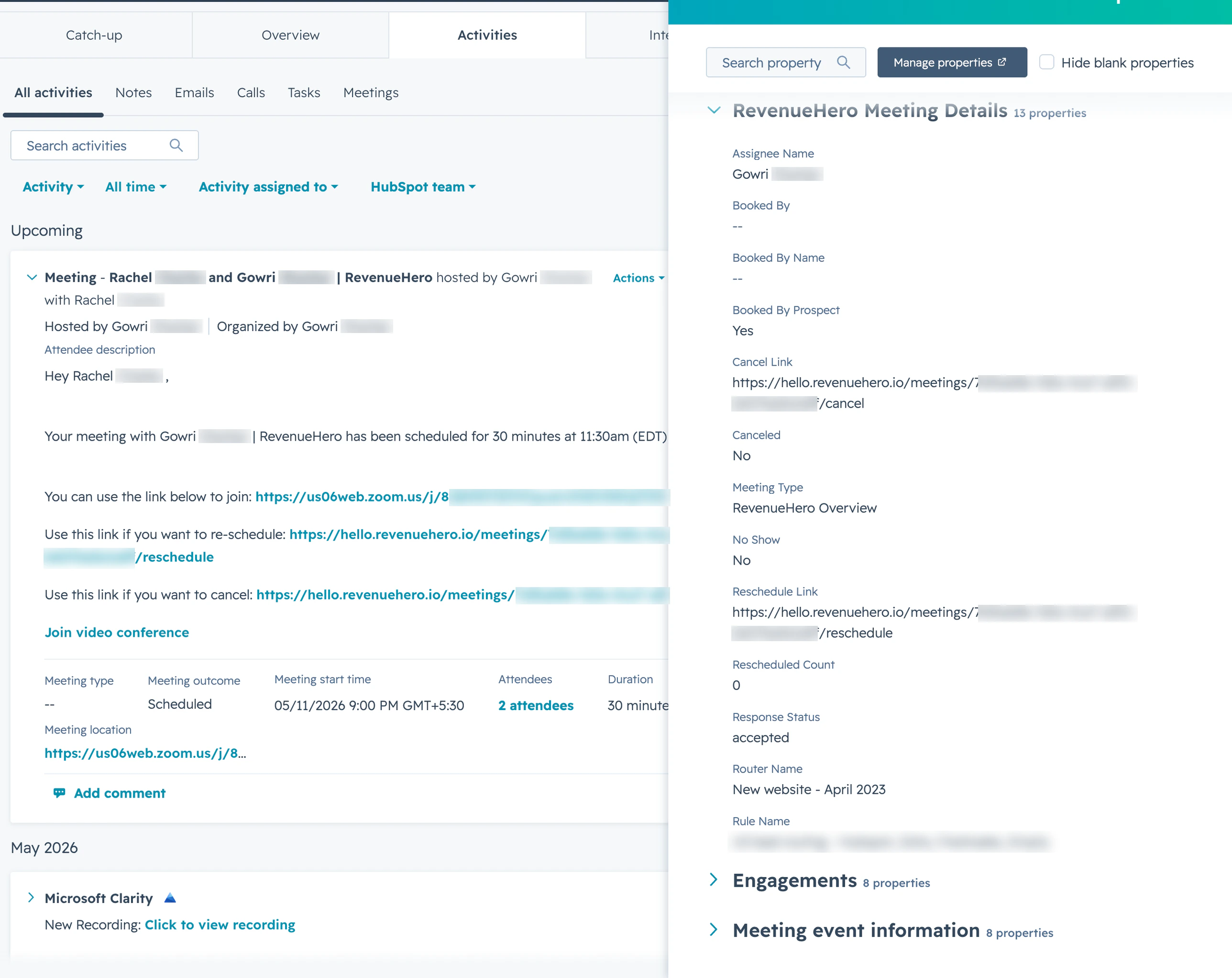
Beyond the default Meeting properties above, RevenueHero now writes a full set of routing and lifecycle context directly onto the HubSpot Meeting Activity itself. This gives you per-meeting reporting on how the meeting was routed, who booked it, the rep it landed with, and how it progressed, without having to join across the Contact record.
WHERE TO FIND THESE FIELDSRevenueHero auto-creates these fields on the Meeting object in HubSpot under a property group called RevenueHero Meeting Details. They show up on the Meeting Activity card on the Contact timeline, and are available as filters and columns when you build custom reports on the Meetings object in HubSpot.
Field LabelInternal Field NameField TypeNotes
Meeting Typerh_meeting_typeSingle-line textThe Meeting Type name for Inbound Router, Campaign Router, Relay, or Handoff Router meetings, and the Meeting Link name for Personal Meeting Links
No Showrh_no_showSingle checkboxTrue when the meeting is marked as No-Show in RevenueHero
Canceledrh_canceledSingle checkboxTrue when the meeting is canceled in RevenueHero
Booked By Prospectrh_booked_by_prospectSingle checkboxTrue when the prospect booked through a form, magic link, or self-serve link. False for direct Relay handoffs booked by an SDR or AE on behalf of the prospect
Rule Namerh_rule_nameSingle-line textThe Matching Rule, Distribution Rule, Handoff Matching Rule, or Distribution Pod that routed this meeting
Assignee Namerh_assignee_nameSingle-line textName of the rep the meeting is assigned to after RevenueHero finishes routing
Router Namerh_router_nameSingle-line textThe Inbound Router, Campaign Router, or Handoff Router the meeting came through
Booked By Namerh_booked_by_nameSingle-line textName of the person who clicked Book (the prospect, or the rep doing a Relay handoff)
Rescheduled Countrh_rescheduled_countNumberHow many times this meeting has been rescheduled. Use this to flag at-risk pipeline
Response Statusrh_response_statusSingle-line textThe booker’s calendar RSVP status (accepted, declined, needsAction, none)
Booked Byrh_booked_bySingle-line textThe HubSpot CRM ID of the person who booked the meeting
Reschedule Linkrh_reschedule_linkSingle-line textThe reschedule URL for the prospect, useful for inserting into HubSpot workflow emails
Cancel Linkrh_cancel_linkSingle-line textThe cancellation URL for the prospect, useful for support and ops workflows
REPORTING IDEASA few things teams commonly build with these properties:
  • Self-serve vs SDR-sourced by filtering on Booked By Prospect = true vs false
  • Routing health by grouping booked meetings by Rule Name to see which rules are pulling weight
  • Reschedule risk by filtering on Rescheduled Count >= 2 to alert AEs early
  • AE pipeline by grouping completed meetings by Assignee Name for handoff accuracy reviews
EXISTING ACCOUNTSIf you connected HubSpot before this feature launched, RevenueHero auto-creates the RevenueHero Meeting Details group and the 13 fields the next time a meeting is booked, rescheduled, or canceled in your account. You don’t need to do anything to enable this. Custom field values are also populated retroactively on the next update for any meeting already in HubSpot.
DON’T RENAME OR DELETERevenueHero looks up these fields by their internal field name (e.g. rh_canceled). If you rename or delete a property in HubSpot, the corresponding value will stop syncing for new and updated meetings until the field is re-created.

Your HubSpot data is in sync. Build the reports, lists, and workflows your team needs without chasing reps for status updates. 🎉🎉🎉

Integrate HubSpot CRM

Connect your HubSpot account to RevenueHero in three steps.

Create a Distribution Rule

Decide which rep gets the meeting after RevenueHero qualifies the prospect.

Create a Matching Rule

Match meetings to existing CRM owners using account, contact, or custom fields.

Create an Inbound Router

Wire your demo form to RevenueHero so meetings start landing in HubSpot.