

BEFORE YOU BEGINRound Robin is an account-wide setting. The method you choose applies to every distribution rule and relay pod in your organization. Change it in Settings → Distribution → Round Robin settings for meeting distribution → Change.
The three methods at a glance
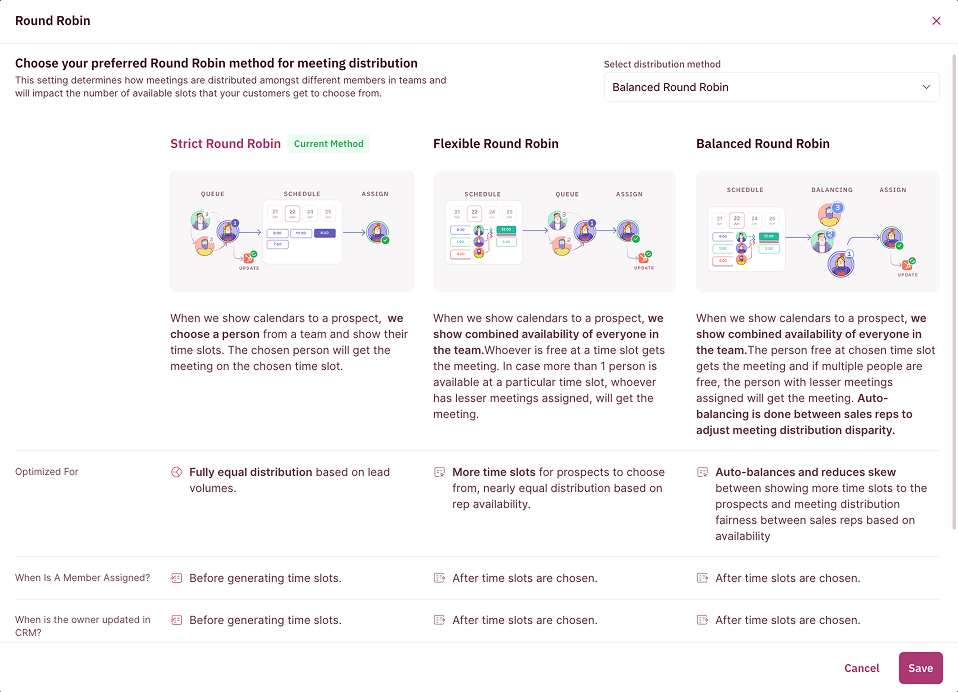
Strict Round Robin
RevenueHero picks a rep from the team first, then shows the prospect only that rep’s open time slots. The chosen rep gets the meeting at the slot the prospect books. Use Strict when you want a predictable, sequential rotation and fully equal distribution tied to lead volume. The trade-off is fewer visible slots, since the prospect only sees one calendar at a time.Flexible Round Robin
RevenueHero shows the prospect the combined availability of everyone in the team. Whoever is free at the slot the prospect picks gets the meeting. If more than one rep is open at that slot, the meeting goes to the rep with fewer meetings assigned. Use Flexible when booking speed and slot availability matter most. Because the prospect sees the whole team’s calendar, there are almost always slots open, which lifts booking rates. Distribution stays near-equal but follows availability rather than a fixed order.Balanced Round Robin
Balanced works like Flexible at the calendar, showing combined team availability, but adds a balancing step. The free rep at the chosen slot gets the meeting, and when multiple reps are free the one with fewer meetings wins. On top of that, RevenueHero auto-balances across reps to reduce distribution disparity, so the busiest and quietest rep stay close together. Use Balanced when even distribution by workload is the priority. For the full detail on how Balanced reads workload, see Balanced Round Robin.How to switch methods
- In the left sidebar, click Settings → Distribution.
- On the Round Robin settings for meeting distribution card, click Change.
- In the Select distribution method dropdown, pick the method you want. The three cards explain each one as you choose.
- Click Save.
That is the difference between the three methods. Pick for booking speed with Flexible, exact rotation with Strict, or workload-balanced fairness with Balanced. 🎉🎉🎉
Balanced Round Robin
The workload-aware method, in depth.
Calibrations
Control how vacations, no-shows, and reassignments affect the queue.
Round Robin History
See where every rep stands in the current cycle.
Create a Distribution Rule
Apply a method inside a routing rule with per-member weightage.